
How do I repair a corrupt Ladybug stream file?
Applicable products
Ladybug6
Ladybug5+
Overview
Sometimes a Ladybug stream file can become corrupted due to errors in the header. When this happens LadybugCap Pro and the stream repair utility are unable to read the stream file.
There are configuration options to reduce the likelihood of a stream file being corrupted. Depending on the issue, there may be methods to recover a corrupted file.
Ladybug Stream File Format
Steam File Signature
Every Ladybug stream file starts with a signature. This signature uniquely identifies the file as a Ladybug stream file.
| Offset | Name | Bytes | Type | Value | Description |
| 0x0000 | Signature | 16 | Character string | PGRLADYBUGSTREAM | Ladybug Stream file identifier |
Stream File Header
The stream header structure begins immediately after the file header at offset 16 from the beginning of the file. It contains the information defined by LadybugStreamHeadInfo in ladybug.h. The byte order of this data block is little endian.
| Offset | Name | Bytes | Type | Description |
| 0x0000 | Ladybug stream version no. | 4 | unsigned int | Stream version number |
| 0x0004 | Frame rate | 4 | unsigned int | The frames recorded per second |
| 0x0008 | Base serial No. | 4 | unsigned int | Ladybug base unit serial number |
| 0x000C | Head serial No. | 4 | unsigned int | Ladybug head unit serial number |
| 0x0010 | Reserved | 104 | unsigned int | Reserved space |
| 0x0078 | Data format | 4 | unsigned int | Image data format defined in ladybug.h |
| 0x007C | Resolution | 4 | unsigned int | Image resolution defined in ladybug.h |
| 0x0080 | Stippled format | 4 | unsigned int | Image Bayer pattern |
| 0x0084 | Configuration data size | 4 | unsigned int | Number of bytes of the configuration data |
| 0x0088 | N - Number of images | 4 | unsigned int | Number of images in this stream file |
| 0x008C | M- Number of index | 4 | unsigned int | Number of entries used in the index table |
| 0x0090 | K - Increment | 4 | unsigned int | Interval value for Indexing the images |
| 0x0094 | Stream data offset | 4 | unsigned int | Offset of the first image data |
| 0x0098 | GPS summary data offset | 4 | unsigned int | Offset of GPS summary data block |
| 0x009C | GPS summary data size | 4 | unsigned int | Size of GPS summary data block |
| 0x00A0 | Frame header size | 4 | unsigned int | Size of internal frame header |
| 0x00A4 | Humidity availability | 4 | bool | Whether humidity sensor is available |
| 0x00A8 | Humidity minimum | 4 | unsigned int | Minimum value for sensor |
| 0x00AC | Humidity maximum | 4 | unsigned int | Maximum value for sensor |
| 0x00B0 | Air pressure availability | 4 | bool | Whether air pressure sensor is available |
| 0x00B4 | Air pressure minimum | 4 | unsigned int | Minimum value for sensor |
| 0x00B8 | Air pressure maximum | 4 | unsigned int | Maximum value for sensor |
| 0x00BC | Compass availability | 4 | bool | Whether compass sensor is available |
| 0x00C0 | Compass minimum | 4 | unsigned int | Minimum value for sensor |
| 0x00C4 | Compass maximum | 4 | unsigned int | Maximum value for sensor |
| 0x00C8 | Accelerometer availability | 4 | bool | Whether accelerometer sensor is available |
| 0x00CC | Accelerometer minimum | 4 | unsigned int | Minimum value for sensor |
| 0x00D0 | Accelerometer maximum | 4 | unsigned int | Maximum value for sensor |
| 0x00D4 | Gyroscope availability | 4 | bool | Whether gyroscope sensor is available |
| 0x00D8 | Gyroscope minimum | 4 | unsigned int | Minimum value for sensor |
| 0x00DC | Gyroscope maximum | 4 | unsigned int | Maximum value for sensor |
| 0x00E0 | Frame rate | 4 | float | Actual frame rate, represented as a floating point value |
| 0x00E4 | Reserved space | 780 | unsigned int | Reserved space |
| … | … | … | … | … |
| Image index [M-1] | ||||
| … | … | … | … | … |
| 0x0BE4 | Image index [2] | 4 | unsigned int | Offset of image 2*K |
| 0x0BE8 | Image index [1] | 4 | unsigned int | Offset of image K |
| 0x0BEC | Image index [0] | 4 | unsigned int | Offset of image 0 |
The image index table between 0x03F0 and 0x0BF0 is used to locate the keyframes of the stream. Using this table can speed up image searching. The value of K (offset 0x0090) means that the index table contains the offset values for every Kth image. The offset values are relative to the beginning of the stream file. For example, if K = 50, the value of 'Image index [5]' is the offset of image 250 (K * 5 = 250). It is the location of image 250 relative to the first byte of the stream file.
For more information, please see your Ladybug camera's Technical Reference Manual, Appendix B Stream File Format.
Preventing a Corrupt Recording
There are various reasons that can cause a Ladybug stream file recording to be corrupted, such as an unstable connection, electromagnetic or noise interference, or a sudden light intensity change.
There are some settings that can help prevent corrupt files.
1. In LadybugCapPro, open the LadybugCapPro Options dialog.
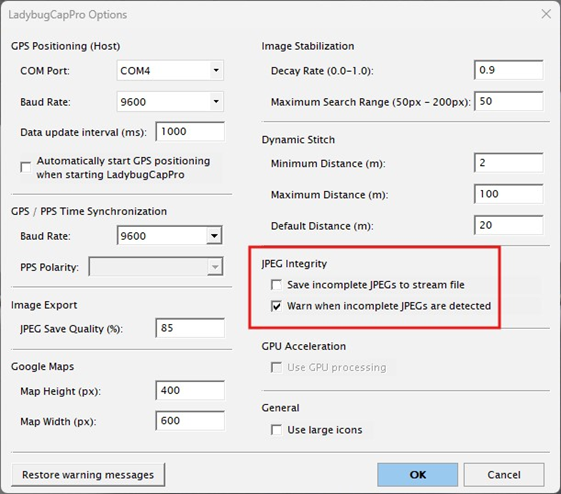
2. Under JPEG Integrity:
- Disable Save incomplete JPEGs to stream file
- Enable Warn when incomplete JPEGs are detected
This feature is available from the Ladybug SDK version 1.18.0.65 and later. When enabled, if a corrupted JPEG image is detected, a warning window pops up during the recording. To avoid missing frames, go back and re-record the data if a warning window pops up.
Another way to prevent corruption of files is to add an extra loop in your code to purge the first ten frames before beginning a recording.
LadybugImage image;
    for (int i = 0; i < 10 && error != LADYBUG_OK; i++)
    {
        printf(".");
        error = ::ladybugGrabImage(context, &image);
    }
Repairing a Corrupt Stream File
Verify the File has Data
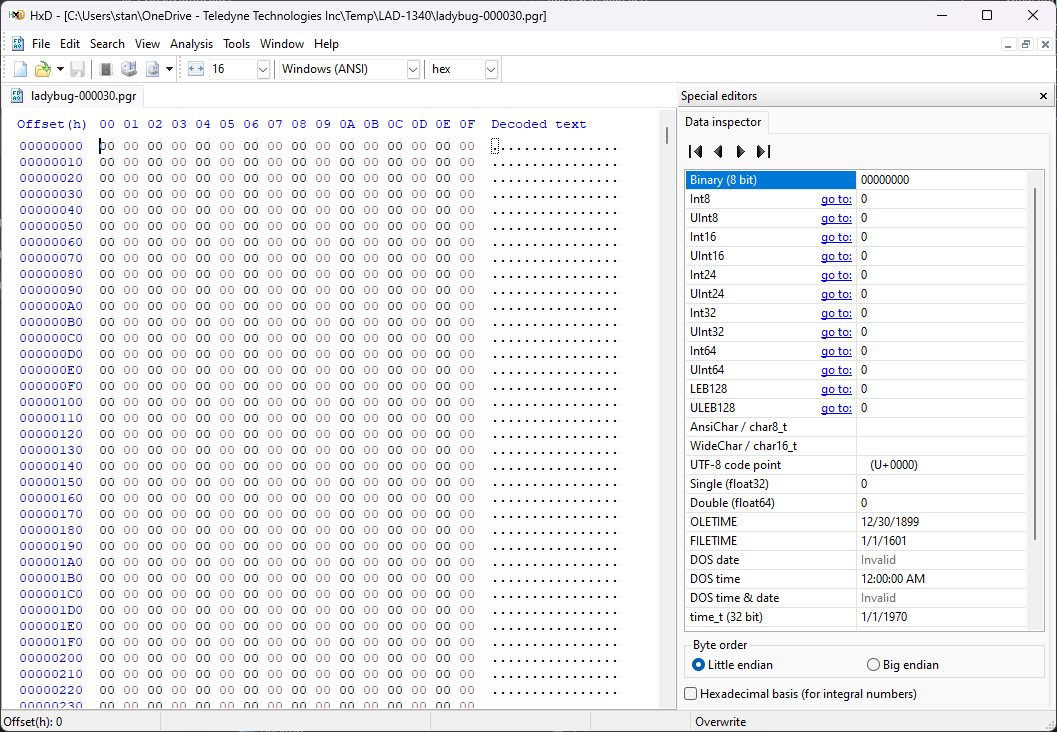
If a stream file is unreadable in LadybugCapPro you can use a hex editor to open the file and check its contents. Our example screens are using HxD Freeware Hex Editor and Disk Editor.
If the stream file still has data, there may be a way to recover the file.
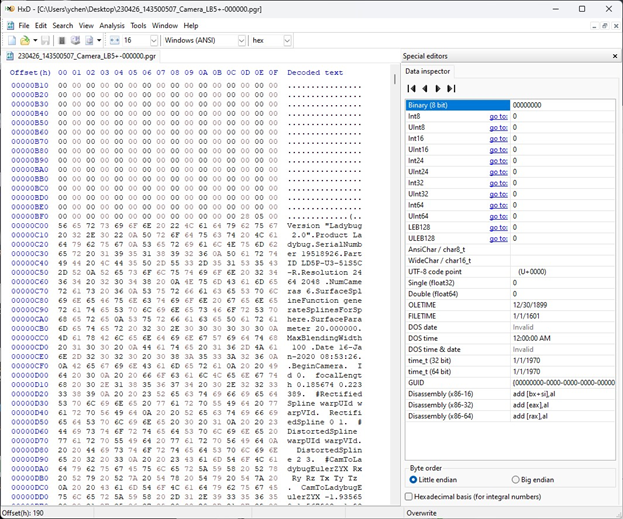
But if the corrupted file only contains '0s' - no data content - the stream file is empty and cannot be recovered.
Use the Stream File Repair Utility
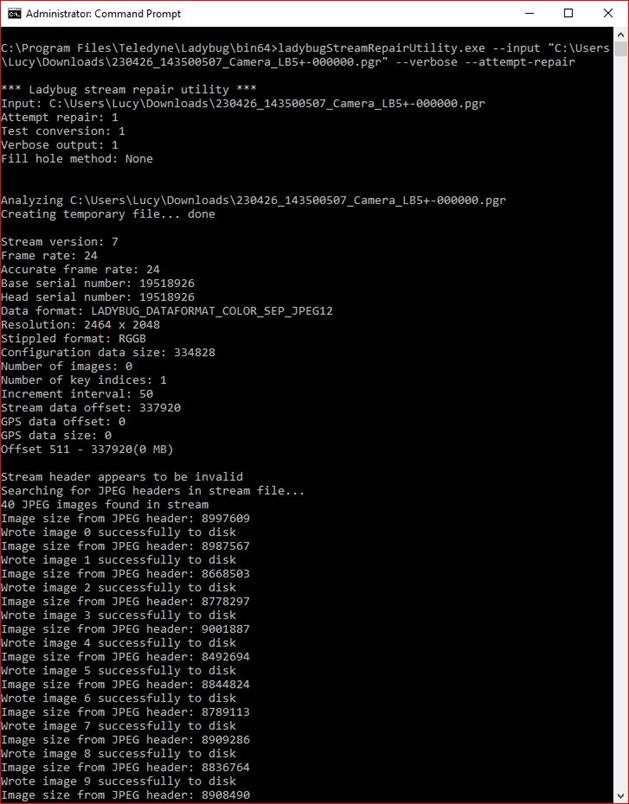
The Stream File Repair Utility attempts to repair stream files that may have become corrupted. It is located under C:\Program Files\Teledyne\Ladybug\bin64
You can use “--help” to show help messages.
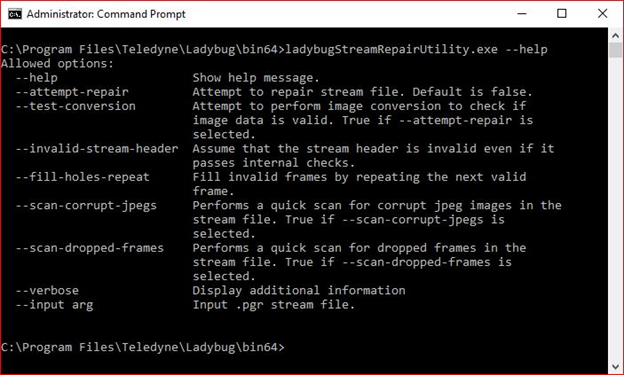
Try to fix a corrupted stream file by specifying the path of your corrupted stream file using --input, and using the --verbose and --attempt-repair flags:
ladybugStreamRepairUtility.exe --input "*location of stream file*" --verbose --attempt-repair
Remove the First Frame
If a stream file is unreadable it may be possible to recover it by removing the first frame.
From the bin/bin64 folder of LadybugCap Pro, run ladybugStreamCopy with the following arguments:
<C:\*location of stream file*> <C:\*location of copy destination*> default 1
This copies from frame 1 to the end of the file and leaves out frame 0 (the first frame).
Contact support if needed.