Cart

Added to cart

Go to cart

Your order qualifies for free 2-day shipping and easy returns

軽量で超小型のUSB3カメラ

Firefly S

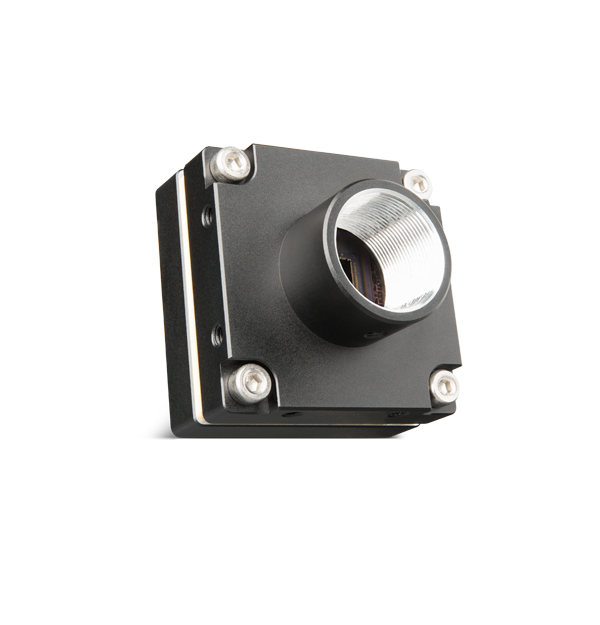
Teledyne FLIR Firefly® Sカメラは、超コンパクトのボディで必要なマシンビジョン機能を実現します。小型、低電力、軽量を特徴とし、ポータブルデバイスに組み込むには最適です。Firefly Sカメラは、カメラ本体に備わったパワフルな機能と最新のCMOSセンサーを組み合わせることで、驚きの価値を提供しています。
Firefly S
小型、軽量、低消費電力

27 mm x 27 mm x 14 mmのフットプリント、20グラムの重量、2.2Wの消費電力で、小型、ハンドヘルド、ポータブルデバイスへの組み込みに最適です。

コアマシンビジョン機能

GPIO、トリガー、部分画像モードなど、マシンビジョンに不可欠な機能を搭載しています。

優れた価値

最新のグローバルシャッターCMOSセンサーを、わずか199ドルからという低価格でご利用いただけます。

露出型センサー:設計と使用例

これらのモデルのセンサーはカメラの電子部品に露出しているため、組み込み型および小型ビジョンアプリケーションにおいて、設計の柔軟性とコスト効率が向上します。ただし、これらのカメラは、特に拡大表示時やコリメート光源を使用する場合など、高い光学的透明性が求められるアプリケーションには適さない場合があります。

センサーパッケージのウィンドウに汚れや埃が付着した場合の対処方法については、「カメラの撮像面のクリーニング」をご覧ください

Model Finder

Megapixels (MP)

Show All

Frame Rate (FPS)

Show All

Pixel Size (μm)

Show All

Spectrum

Show All

Sensor Model

Show All

Sensor Format

Show All

Read Noise (e-)

Show All

Results:

Reset Filters
Showing 12 results
Product MP FPS センサー スペクトラム Status Compare
Firefly S USB3: 0.4 MP、モノクロ、Cマウント
FFY-U3-04S2M-C
0.4 121 Sony IMX297 Mono In Production Request Info Firefly S
Firefly S USB3: 0.4 MP、モノクロ、CSマウント
FFY-U3-04S2M-CS
0.4 121 Sony IMX297 Mono In Production Request Info Firefly S
Firefly S USB3: 0.4 MP、カラー、CSマウント
FFY-U3-04S2C-CS
0.4 120 Sony IMX297 Color In Production Request Info Firefly S
Firefly S USB3: 0.4 MP、カラー、Cマウント
FFY-U3-04S2C-C
0.4 120 Sony IMX297 Color In Production Request Info Firefly S
Firefly S USB3: 0.4 MP、カラー、Sマウント
FFY-U3-04S2C-S
0.4 120 Sony IMX297 Color In Production Request Info Firefly S
Firefly S USB3: 0.4 MP、モノクロ、Sマウント
FFY-U3-04S2M-S
0.4 120 Sony IMX297 Mono In Production Request Info Firefly S
Firefly S USB3: 1.6 MP、カラー、Cマウント
FFY-U3-16S2C-C
1.6 60 Sony IMX296 Color In Production Request Info Firefly S
Firefly S USB3: 1.6 MP、カラー、CSマウント
FFY-U3-16S2C-CS
1.6 60 Sony IMX296 Color In Production Request Info Firefly S
Firefly S USB3: 1.6 MP、カラー、Sマウント
FFY-U3-16S2C-S
1.6 60 Sony IMX296 Color In Production Request Info Firefly S
Firefly S USB3: 1.6 MP、モノクロ、Cマウント
FFY-U3-16S2M-C
1.6 60 Sony IMX296 Mono In Production Request Info Firefly S
Firefly S USB3: 1.6 MP、モノクロ、CSマウント
FFY-U3-16S2M-CS
1.6 60 Sony IMX296 Mono In Production Request Info Firefly S
Firefly S USB3: 1.6 MP、モノクロ、Sマウント
FFY-U3-16S2M-S
1.6 60 Sony IMX296 Mono In Production Request Info Firefly S

Media gallery

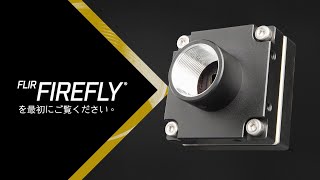
FLIR Firefly を最初にご覧ください
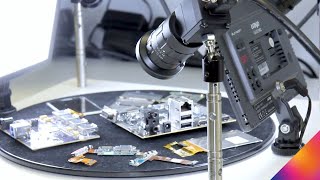
On-camera deep learning & third generation Pregius – in action!

Resources & Support

Technical Guidance

How do I increase the dynamic range of my camera?

詳細を見る

Technical Guidance

How is camera imaging performance measured?

詳細を見る

Technical Guidance

Sensitivity and lux measurements for our cameras

詳細を見る

System Requirements

Providing power to the camera

詳細を見る

Troubleshooting

Providing a kernel-mode memory dump to debug Windows crashes

詳細を見る

Troubleshooting

Change Windows default camera driver search location to avoid start-up delays

詳細を見る

Troubleshooting

Camera not recognized by Windows operating system and not listed in Device Manager.

詳細を見る

Article

Overview of the Teledyne FLIR technical support process

詳細を見る

Troubleshooting

Using Windows Device Manager to determine the camera's software and driver versions

詳細を見る

Application Note

Using USB3 Vision Cameras with MVTec HALCON 11 in Windows

詳細を見る

Below are assets shared by all models of this product family.

For model-specific assets, select an option in the Model Finder above.

You must be logged in to download software or firmware. Please sign in or create an account here.

Spinnaker SDK All Versions for Download

Software Download

Download

Below are assets shared by all models of this product family.

For model-specific assets, select an option in the Model Finder above.

Firefly USB3 Getting Started

Quick Start Guide

Download

Firefly USB3 Installation Guide

Installation Guide

Download

Firefly S/DL CAD Drawings

Drawing

Download

Contact Support

Your question may be answered in one of our 300+ Knowledge Base articles. Visit our Support Center and search for your product or the topic you have a question about.

Check out our Community Forum for answers and discussion.

To submit a support ticket, visit our Technical Support Center, or call us at +1-604-242-9937 (select option 2).

To request an RMA, please complete our Return and Repair Request Form.

Related Products

購入前のお問い合わせ